mySQL: UNION Part 2

I track visitors to my app and CD pages by storing each visit in a log file. I can get the total visits for CDs with this code. I use a RIGHT OUTER JOIN because I only want to count visits for CDs. They are in the product table, so if I use a RIGHT OUTER JOIN I will not get any rows that are from the apps.


SELECT product.name, product_id, COUNT(*) FROM log 
RIGHT OUTER JOIN product
ON product.id = log.product_id
GROUP BY product_id
ORDER BY COUNT(*) DESC

Total visits for apps is from this code. I need to subtract 100 from the product_id because apps and CDs both start their ids with 1. To differentiate them, I add 100 to apps before putting them into the log table.


SELECT app.name, product_id, COUNT(*) FROM log 
RIGHT OUTER JOIN app
ON app.id = (log.product_id - 100)
GROUP BY product_id
ORDER BY COUNT(*) DESC

To combine the two results into one table, I use a UNION. I renamed the first column of each table so that combined table will display the column header as name. I want to sort on COUNT(*) but that isn’t available in the UNION so I rename COUNT(*) to count. Now I have a named column in the resulting table and I can sort on it.


SELECT app.name AS name, product_id, COUNT(*) AS count
FROM  log 
RIGHT OUTER JOIN app ON app.id = ( log.product_id -100 ) 
GROUP BY product_id

UNION 

SELECT product.name AS name, product_id, COUNT(*) AS count
FROM  log 
RIGHT OUTER JOIN product ON product.id = log.product_id
GROUP BY product_id
ORDER BY count DESC

One caveat. Because I used RIGHT OUTER JOINs, there may be rows in the log table that were not summarized. In fact there are several from the landing page that are not counted.
mySQL: Subqueries Part 1

I’m reading about subqueries and thought I’d try a simple one. It doesn’t make sense to actually do it, but it is a good one to start with. Find all of the customer’s whose state starts with a ‘C’.


SELECT * FROM `customers` 
WHERE state IN (SELECT state FROM ASHA WHERE state LIKE 'C%')

This is actually a very inefficient query, taking 24.1081 seconds. The normal way to do this query,

SELECT * FROM `customers`
WHERE state LIKE 'C%')

takes 0.0008 seconds. So the first lesson I learned is think about whether a subquery is the best way to do what you want. Even though this is a ‘simple’ query, the subquery runs for each row in the outer query. And the subquery queries each row in the table. So you can see that the number of queries that are run is n2.

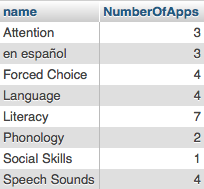
Here’s one that makes more sense. Each app belongs to a category. The category table is the same one I used in other posts. Not all categories are being used in apps. But each app has a category. I’d like to know how many apps are in each category.


SELECT category.name, categorycount.NumberOfApps 
FROM category 
INNER JOIN
(SELECT category_id, COUNT(*) AS NumberOfApps FROM apps GROUP BY category_id) categorycount
ON categorycount.category_id =  category.id
ORDER BY LOWER(category.name)

This yields the following results in phpMyAdmin:
Category Count

A couple of interesting things about this query. First note that the subquery is labeled with an alias. And all of the column names are preceded by a table name or alias. If you run the subquery by itself, you get a table that has eight rows in it. The inner join just matches the names of the categories with the category ids from the apps table. Since the subquery is able to be independently run, this is what is called a simple query. The ORDER BY statement uses LOWER to put the categories in strict alphabetical order because one of the categories is lower case and it will appear at the end of the table if you don’t use LOWER.

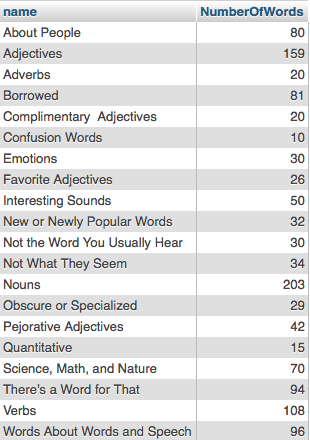
In a previous post I used the favorite words database to do an INNER JOIN. Here I use it to count the number of words in each category. Since the tables are set up similarly to the apps, I can make just a slight modification to the query and it works.


SELECT words_categories.name, categorycount.NumberOfWords
FROM words_categories 
INNER JOIN
(SELECT category_id, COUNT(*) AS NumberOfWords FROM words GROUP BY category_id) categorycount
ON categorycount.category_id =  words_categories.id
ORDER BY LOWER(words_categories.name)

Word Count

In this case, the subquery makes it pretty clear what you are trying to do. But you can also write this as an INNER JOIN without the subquery.


SELECT words_categories.name, COUNT(*) AS NumberOfWords
FROM words_categories 
INNER JOIN
words
ON words.category_id =  words_categories.id
GROUP BY words_categories.name
ORDER BY LOWER(words_categories.name)

The subquery is actually a bit faster, .0002 sec vs .0003 without. This is a small table with around 1200 entries so it doesn’t make any difference.

mySQL: UNION

I wanted to find all of the emails in my customer database that were duplicates. This could be because several people at the same business share an address or because someone is in the database twice with slightly different spellings of their name e.g. Kathy and Kathleen, or with and without a middle initial, etc.

Before I started I set all of the email addresses that were empty strings to NULL, since joins don’t match on NULL but do on empty strings.

Then on the first try I used this:


SELECT t1.name, t1.email, t2.name, t2.email
FROM customers AS t1
INNER JOIN customers AS t2 
ON t1.email = t2.email
WHERE t1.name <> t2.name

Or in WHERE notation.

SELECT t1.name, t1.email, t2.name, t2.email
FROM customers AS t1, customers AS t2 
WHERE t1.email = t2.email
AND t1.name <> t2.name

I got 384 records, but I got a lot of duplicates where t1.name and t2.name are reversed. i.e.


Helen Jaffa     hjaffa@ino.net   Helen A Jaffa   hjaffa@ino.net
Helen A Jaffa   hjaffa@ino.net   Helen Jaffa     hjaffa@ino.net

To eliminate duplicates I used a UNION and two OUTER JOINS


SELECT t1.email, t1.name
FROM customers AS t1
LEFT OUTER JOIN customers AS t2 ON t1.email = t2.email
WHERE t1.name <> t2.name
UNION
SELECT t2.email, t2.name
FROM customers AS t2
LEFT OUTER JOIN customers AS t1 ON t1.email = t2.email
WHERE t1.name <> t2.name

This yielded 343 records and no duplicates.

mySQL Self-join

Looking through my tables, I don’t have any where a self-join makes any sense. I do have one table where it will work. In the Minimal Pairs game, each word is associated with another word. A pair might be “stop – top” or “rake – wake”. We have a picture for each word and by doing a self-join, we can see which pictures are duplicated.


SELECT * 
FROM Pairs AS t1 
INNER JOIN Pairs AS t2 
ON t1.word1 = t2.word2

The result shows that two images, key and car, are used twice.
Self-Join

If you like WHERE syntax, this is it:


SELECT * 
FROM Pairs AS t1, Pairs AS t2 
WHERE t1.word1 = t2.word2

MySQL: Working with Multiple Tables

As mentioned earlier, I’m re-reading the Visual QuickStart Guide to SQL and working out some examples. I’m using phpMyAdmin, so the examples here have backticks. I’m using two tables. The first is a table of words and definitions. The second is examples of word usage from the internet.

In this query, I’m looking for the words that have the most usage citations. It turns out that the top three are egregious with 21 citations, interlocutor with 15, and trepidation with 15.


SELECT `words`.`word`, COUNT(*)
FROM `words` 
INNER JOIN `usage`
ON `words`.`word` = `usage`.`word`
GROUP BY `words`.`word`
ORDER BY COUNT(*) DESC
LIMIT 20

Find all the words that are not in the definition portion – mostly alternate spellings and plurals. This table has the number of rows that are in the usage table.


SELECT `words`.`word`, `usage`.`word` 
FROM `words` 
RIGHT OUTER JOIN `usage`
ON `words`.`word` = `usage`.`word`
ORDER BY `words`.`word`  ASC

After I cleaned up the tables so that every word has at least one usage example and every example is associated with a word I ran the counts again. Just for fun I ran a RIGHT OUTER JOIN or a LEFT OUTER JOIN instead of an INNER JOIN. As you can probably guess, I got the same result with all three methods.

You can also use WHERE syntax and in this case it yields the same result as well.


SELECT `words`.`word`, `usage`.`word` 
FROM `words`,`usage`
WHERE `words`.`word` = `usage`.`word`
GROUP BY `words`.`word`

Simulate a FULL OUTER JOIN. In this case, since we cleaned up the database in the previous step, it has the same number of rows as words.


SELECT `words`.`word`, `usage`.`word`
FROM `words`
LEFT OUTER JOIN `usage`
ON `words`.`word` = `usage`.`word`

UNION

SELECT `words`.`word`, `usage`.`word`
FROM `words`
RIGHT OUTER JOIN `usage`
ON `words`.`word` = `usage`.`word`

BIG difference between UNION and UNION ALL. UNION ALL doesn’t remove duplicates.

While I was cleaning up tables, I looked at my products and product details tables to see if there were any orphaned product details. This query finds the rows in product_details that are not in product:


SELECT `product`.`name`, `product_details`.`product_id`
FROM `product`
RIGHT OUTER JOIN `product_details`
ON `product`.`id` = `product_details`.`product_id`

I already know that there are no products without details, otherwise the website would be broken. But this query checks for that.

SELECT `product`.`name`, `product_details`.`product_id`
FROM `product`
LEFT OUTER JOIN `product_details`
ON `product`.`id` = `product_details`.`product_id`
