The answer to my question was hinted at in this question on StackOverflow, so I think the answer is to disable autolayout for my UIToolbar view. But I was not sure how to do that with programmatically designed views. Fortunately, someone else knew how to do it.
The code that is said to work for views is
cButton.translatesAutoresizingMaskIntoConstraints = YES;
But I’m not sure if it applies to my code since UIToolbar doesn’t inherit from UIView.
I have lots of small images that I use in my games that are different sizes depending on the device and orientation. Rather than having lots of different images, and adding new ones when Apple introduces new devices, I decided to make one 160×160 image fore each and then resize it when it is used. This worked fine from iOS 4 – iOS 10 but fails in iOS 11.
The code is pretty straightforward:
// Get the image
NSString *pictFile = [[NSBundle mainBundle] pathForResource:@"Correct" ofType:@"png"];
UIImage *imageToDisplay = [UIImage imageWithContentsOfFile:pictFile];
UIImage *cImage  = [UIImage imageWithCGImage:imageToDisplay.CGImage scale:[UIScreen mainScreen].scale orientation:imageToDisplay.imageOrientation];

UIButton *cButton = [UIButton buttonWithType:UIButtonTypeCustom];
[cButton setImage:cImage forState:UIControlStateNormal];
[cButton setTitle:@"c" forState:UIControlStateNormal];

//set the frame of the button to the size of the image
cButton.frame = CGRectMake(0, 0, standardButtonSize.width, standardButtonSize.height);

//create a UIBarButtonItem with the button as a custom view
c = [[UIBarButtonItem alloc] initWithCustomView:cButton];
This is what it looks like pre11. The bar button items have been resized and fit nicely in the bottom bar. Note I reduced the size of the checkmark by 50% just to make sure I was looking at the correct code and that it behaves like I expect.
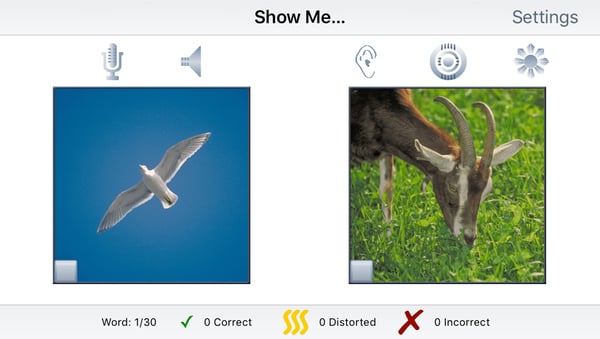
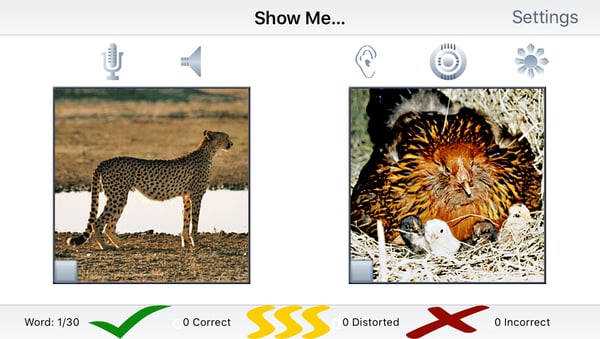
Here’s what they look like in the simulator for Xcode 9.0 GM and iOS 11. Note that the top row of buttons resize correctly but the bottom row expand to fill the space allocated for the tab bar. The same behaviour happens on iPads as well and various devices.
The answer provided by FallStreak is:
BarButtonItem (iOS11\xCode9) uses autolayout instead of frames. Try this (Swift):
if #available(iOS 9.0, *) {
    cButton.widthAnchor.constraint(equalToConstant: customViewButton.width).isActive = true
    cButton.heightAnchor.constraint(equalToConstant: customViewButton.height).isActive = true
}
The Objective C version that I worked out is:
if (@available(iOS 9, *)) {
     [cButton.widthAnchor constraintEqualToConstant: standardButtonSize.width].active = YES;
     [cButton.heightAnchor constraintEqualToConstant: standardButtonSize.height].active = YES;
}